Independently engineered · streams to your Tesla's browser

Real Android apps, right on your Tesla's screen.

TessDrive is a small standalone device — think a streaming box or smart TV, but for your Tesla's screen. It runs full Android, so you install any apps you want (Netflix, Prime, YouTube, anything) right on it and watch by touch. No phone app, no mirroring, nothing wired into your car.
Install any app — not a locked menu 1080p · smooth & fluid Built-in storage No SIM · no data plan
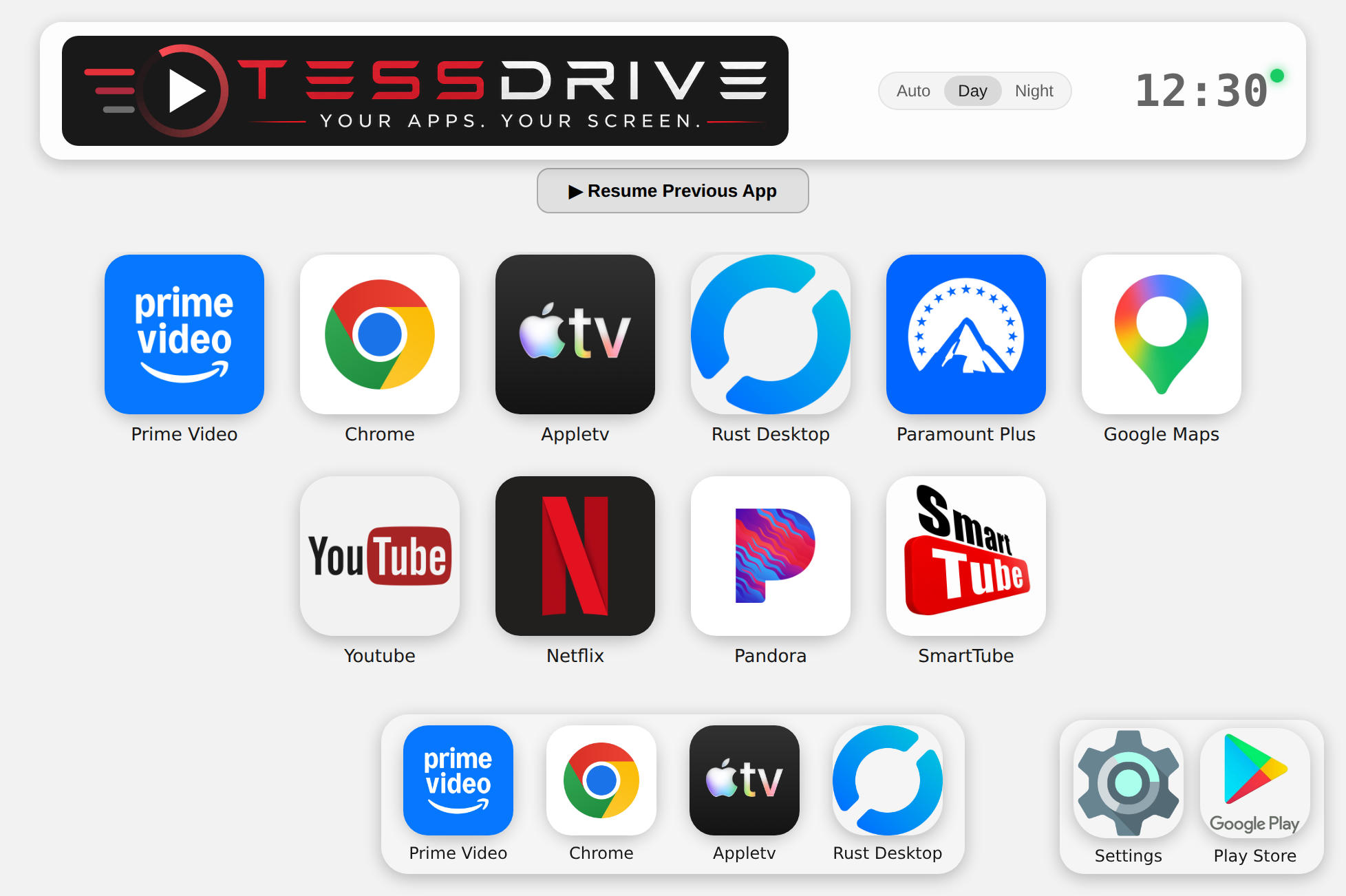
The TessDrive home screen in a Tesla browser — app grid, docks, day/night control and a live clock
Live preview — the same Day/Night control that's built into the device.

Runs the apps you already use

Prime VideoNetflixYouTubeParamount+ Apple TVMaxDisney+PandoraChrome …& any app you install

The whole point

Real Android.
Not a locked box.

Most in-car streaming boxes hand you a fixed menu of apps someone else picked. TessDrive isn't that. It runs a real, customized build of Android on its own hardware — so if an app runs on Android, TessDrive should run it as well. App compatibility, honestly →
  • Install any app with the built-in App Installer — not a curated shortlist
  • Sideload any APK, like a normal Android device
  • No artificial restrictions or vendor lock-in
  • Refined continuously — updates delivered over the air
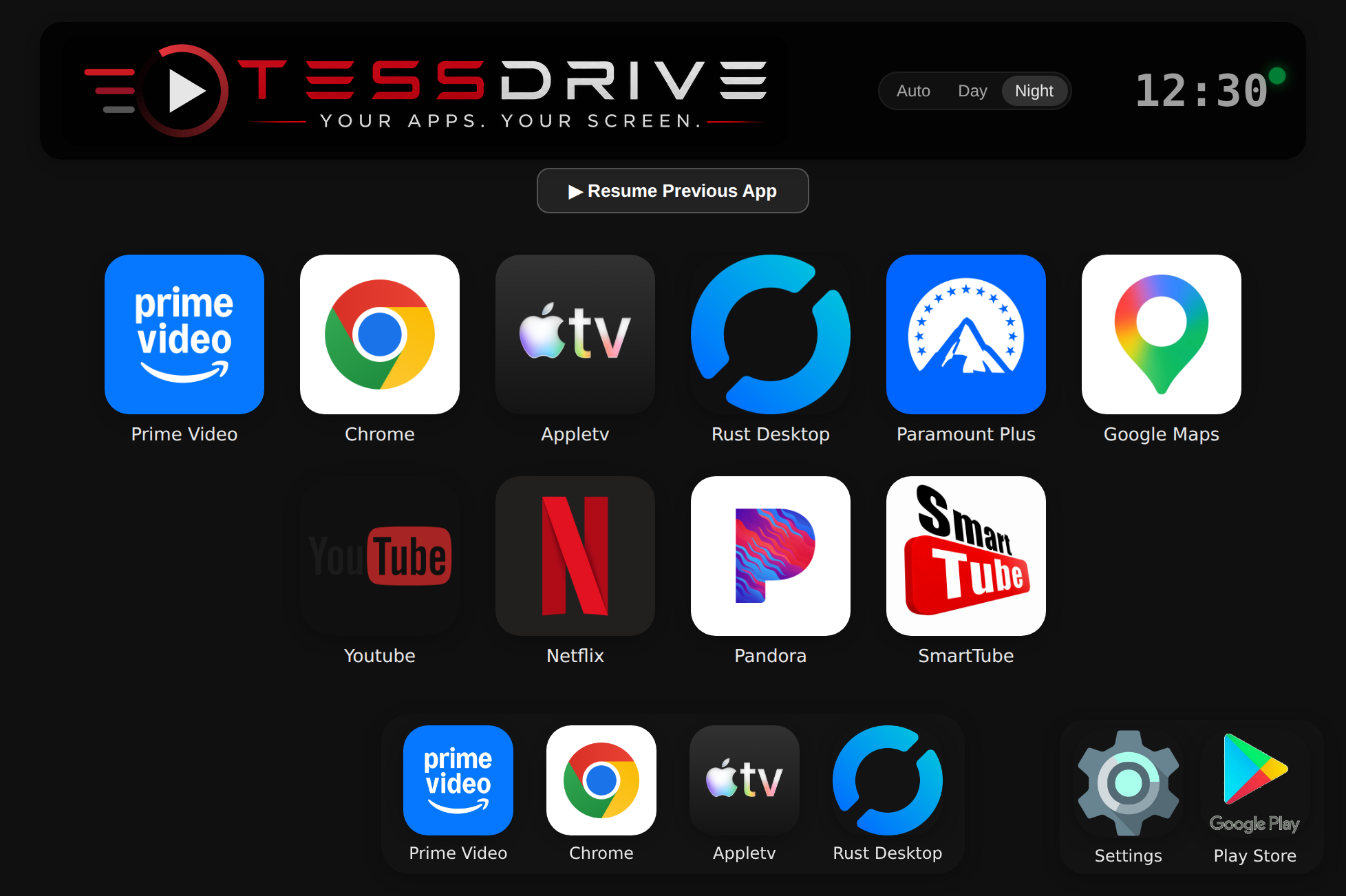
TessDrive app grid in night theme
P R N D 21MPH 8:5473°267 mi
Autopilot
TessDrive
🔒device.tessdrive.app
The TessDrive home screen, live in the Tesla browser
69°

A real screenshot of the actual TessDrive UI, shown in the right-side browser card. The car keeps its own driving view on the left.

See it in the car

Exactly what you get, driving.

On the move, your Tesla splits the screen — the car's driving view stays on the left, and your apps live in the card on the right. TessDrive runs right there, in the browser that's already built in.

Park, and it opens full-screen with a single tap.

What people use it for

Built for the way you actually drive.

Road-trip streaming

Netflix, Prime, Paramount+, YouTube and more — on the Tesla's own screen. No second device, no phone propped in a cupholder. Just press play, and the miles disappear.

Rear-seat & passenger control

Because it's open Android — not a locked, single-purpose box — you can use standard remote-control tools to drive a rear tablet or aftermarket screen, and change what a passenger is watching from the front seat. A closed device simply can't.

Open, like Android

It runs genuine Android apps you install yourself — and you keep core Android functions like Settings. It's purpose-built to present those apps beautifully in your Tesla's browser, not to mirror a whole desktop.

How it works

Power it in the car, connect, and watch.

Think of it like a Fire Stick or Roku — but for your Tesla's screen. Power TessDrive in your car, connect your Tesla's browser to it, and your apps are on the screen — tap and watch. It passes your internet (navigation included) straight through, so nothing else about your car changes.
WiFi
Your hotspot
phone hotspot or any WiFi — your internet
TessDrive app
TessDrive
creates its own private WiFi

Passes your internet straight through — and adds your apps.

🔒device.tessdrive.app
The TessDrive home screen, live in the Tesla browser
In your Tesla
✓Navigation & Connectivity — Web, Grok, Tesla native apps
✓Your Android Apps — on screen

No Will my car lose internet?

Connecting your Tesla to TessDrive works just like connecting it straight to a hotspot — only with TessDrive sitting in between. Your internet, navigation included, passes right through. Unless you open the TessDrive page, you won't notice any difference.

You still bring the internet — a phone hotspot or any WiFi. TessDrive just carries it through to your car and brings your apps along for the ride.

1

Power it in your car

Runs Android on its own hardware. Point it at your phone's hotspot or any WiFi for internet.

2

Connect the Tesla browser

Join the private WiFi TessDrive creates, then open its page in the car's built-in browser.

3

Touch and go

Your apps are on screen — tap, swipe, play. Your car keeps full internet the whole time.

TessDrive vs. other devices

No wires. No dash panels to remove.
No risk to your car.

The biggest difference doesn't fit on a spec sheet: TessDrive never touches your car's electronics. It talks to your Tesla the way any website does — over WiFi, through the browser that's already there.

TessDrive
Other Devices
Premium streaming (Prime, Netflix)
TessDriveProtected apps play — picture and sound.
Other devicesScreen-mirroring adapters often black-screen on DRM apps (audio only).
Installation
TessDrivePower on, connect to WiFi. Done.
Other devicesSome require accessing your Tesla's MCU or diagnostic connector, often behind interior panels.
Connection
TessDriveStreams over WiFi to your Tesla's own browser.
Other devicesSome physically wire into the car's display system.
Vehicle access required
TessDriveNone — nothing is opened, removed, or wired in.
Other devicesSome require panel removal and direct connection to vehicle electronics.
App availability
TessDriveInstall any app with the built-in App Installer, plus full sideloading.
Other devicesSome limit you to a fixed, pre-selected app menu.
Internet
TessDriveConnects through your phone's hotspot or WiFi you already have.
Other devicesSome require a dedicated cellular modem and separate data plan.
Storage
TessDriveFast, durable built-in storage.
Other devicesSome rely on microSD cards, which wear out over time.
Risk to your vehicle
TessDriveZero — no disassembly, nothing physically connected.
Other devicesSome involve direct access to vehicle electronics.

The short version: across the current landscape of Tesla add-on devices, common tradeoffs include opening up your dash and wiring into the car's systems, being limited to a handful of pre-approved apps, or needing a dedicated cellular plan just to stay connected. TessDrive avoids all of that — a self-contained device that talks to your Tesla the same way any website does.

Why TessDrive

Reliable — not just impressive on paper.

Honest engineering choices that matter once the novelty wears off.

Built-in, not a memory card

Runs from fast, durable built-in storage — not a microSD card that wears out. Built for a device that lives in your car.

Its own Access Point — no SIM

Creates a WiFi Access Point for your Tesla to connect to, and gets online through your phone's hotspot or another connection you provide — no cellular modem, no SIM, no monthly plan to babysit.

Tuned for smooth video

We didn't just pipe video across — we put the real work into keeping it smooth and responsive, at the sharpest resolution each app allows.

Install any app

A built-in App Installer that finds and installs any app, plus sideloading — not a vendor's curated shortlist of a dozen approved apps.

Smooth
fluid, lag-free video
1080p
Full-HD stream
Millions
apps · install any of them
0
SIMs or data plans

Geek out

Under the hood — this is
not screen mirroring.

For the technically curious: the engineering that makes TessDrive feel effortless. Every card below is a real problem we solved — so you never have to think about it.

render / per-app

A real device, not a phone mirror

Each app runs natively on the TessDrive device — never a mirror of some phone's screen. That's the line between a real app-streaming appliance and a screen-share hack.

net / uplink-keeper

Relentless self-healing uplink

Most WiFi stacks try a hotspot a few times, hit a timeout, and give up — leaving you to reconnect by hand. TessDrive interrogates the uplink continuously, clears the OS's own “wrong password” lockout, and keeps re-attempting until it's on. No reboot, no fiddling.

display / always-on

A rock-steady picture

TessDrive keeps a live, rock-steady picture on your screen at all times — no frozen frames, no random black-outs, whether a movie's playing or a menu's just sitting there. It's the kind of reliability you only notice when it's missing on everything else.

codec / hw-accel

Hardware-encoded video

The stream is encoded by a dedicated on-chip video encoder, not brute-forced in software. That's how it holds smooth, fluid 1080p at low latency where a general-purpose board would stutter and drop frames.

net / ap-watchdog

Self-healing access point

A watchdog watches the car-facing WiFi for the subtle failure mode where it's “up” but silently refusing to authenticate clients — and heals it automatically, escalating from a radio restart all the way to re-binding the adapter, before you'd ever notice.

…and plenty more below the surface: a genuine TLS certificate so the car's browser shows a real padlock instead of a warning, cryptographically-signed over-the-air updates with beta and stable channels, real system audio captured at the source and streamed in sync with the video, and an entire Android OS built from source and tuned for this one job. We went well beyond simple screen sharing — and we're still going.

Handcrafted precision

Meticulously Crafted.
Built by an engineer,
not a boardroom.

“

TessDrive started because my own family wanted to watch something on road trips without cluttering the car with another screen. So I built the thing I wished existed — real Android, on the screen that's already there.

The developer behind TessDrive

Every TessDrive is handcrafted and tuned for a single purpose — the way a fine watch or a race car is built for theirs. Nothing here is "good enough to ship." It's engineered, tested, and refined until it's right — real work, fast iteration, and honest answers instead of a faceless-factory black box. When something can be better, it usually is by the same week.

Our promise

Buy it once. Keep it for good.

Two commitments we're making in writing, today — long before any campaign. Because the worst thing a gadget company can do is hold your device hostage, or walk away and leave you with a brick.

No subscription. Not now, not ever.

TessDrive is a one-time purchase. Every feature is included, and every improvement we ship lands free, over the air, for the life of your device. No monthly fee. No paywalled features. No "pro" tier. While others charge by the year just to stream in your car, TessDrive is buy-it-once — on purpose.

No bricked boxes — even if we're gone.

Your TessDrive does its work right in the car. The one online piece is the secure address your Tesla's browser connects through — and we've paid the domain and SSL for 10 years upfront so it can't lapse, with a security certificate that renews itself. So if we ever wind the company down, you're never left with a dead box because a company folded. And even future updates don't have to end: every phone, tablet and computer operating system eventually reaches end of life — the difference is that if TessDrive is ever discontinued, we're committed to publishing what's needed as open source, so anyone who wants to keep it alive can.

$0
per month, forever
10 yrs
domain & SSL paid upfront
Free
OTA updates for life
0
paywalled features

Straight answers

Questions, answered honestly.

What exactly is TessDrive — is it an app?
It's a small standalone device that runs full Android — not an app, not a screen-mirror, and your phone isn't required to run it. It's its own little media player for the car — you install any apps you want right on it, and they appear on your Tesla's display through its browser. Behind the simple tap-and-go is a lot of real engineering, built for reliability in the car.
Which Teslas are compatible with TessDrive?
If your Tesla has a modern browser (MCU2 or newer), yes. All Model 3, Model Y, and Cybertruck vehicles qualify, and Model S / X from roughly mid-2018 onward (or an older S/X since upgraded to MCU2). How to check your car →
Will TessDrive affect my FSD, warranty, or Tesla account?
No. TessDrive only uses your Tesla's built-in web browser — it's a separate device the browser simply displays a page from. It never connects to, modifies, or communicates with any vehicle system: not FSD or Autopilot, not the car's firmware, not the diagnostic port, and not your Tesla account. Nothing about your car is changed. FSD is a capability tied to your car and account when you buy it — viewing a web page can't add or remove it. There's no jailbreak, no root, and no modification to the vehicle, so there's nothing to void. It also doesn't unlock, bypass, or circumvent anything on your car — no paid features, no subscriptions, no regional locks; it's purely entertainment played through the browser. And your browsing stays in the browser — Tesla doesn't receive it. To your Tesla, it's simply the browser loading a website, exactly what it's built to do.
Is there a monthly subscription or any recurring fee?
No — and there never will be. TessDrive is a one-time purchase. Every feature is included, and every future improvement is delivered free over the air for the life of the device. No subscriptions, no paywalled features, no add-on tiers — unlike car-streaming services that charge a monthly or yearly fee. When you buy TessDrive, you own it.
What happens to my TessDrive if the company goes away?
It keeps working. TessDrive streams locally in your car; the only online dependency is the secure web address your Tesla's browser connects through. We've paid the domain and SSL for 10 years upfront so it can't lapse, with an auto-renewing security certificate. So if we ever wind down, you're never left with a bricked box because a company folded. And even future updates don't have to end: every phone, tablet and computer operating system eventually reaches end of life — the difference is that if TessDrive is ever discontinued, we're committed to publishing what's needed as open source, so anyone who wants to keep it alive can. (The open-source commitment is there for the day the product would otherwise be retired for good.)
Is it safe to sign into personal accounts or do banking on TessDrive?
TessDrive is an entertainment device — built for streaming and media, and that's what we recommend signing into (Netflix, YouTube, Disney+, and the like). It's not designed as a secure device for sensitive activity, so we don't recommend banking, payments, or storing personal or financial data on it. Like any device left in a vehicle, anyone with physical access to it could reach accounts or data you've signed into. Keep sensitive accounts on your phone, use TessDrive for entertainment — and always factory-reset it before selling or handing it on.
Do I need a USB cable, a dongle, or to plug anything into the car?
Only the included simple USB power cable, for power. Everything else is wireless: TessDrive streams to your Tesla's built-in browser over its own private WiFi, so other than that power cable, nothing plugs into the car. Unlike USB- or cable-based Android boxes, nothing is wired into your Tesla's electronics, screen, or diagnostic port.
Is TessDrive open source or a community project?
No. TessDrive is a commercial product — independently engineered and sold directly to customers. Because it's built on Android and Linux, we publish the required GPL kernel source and open-source license attributions for compliance, but the product itself is not an open-source or community project.
Won't DRM protection give me a black screen, like screen-mirroring adapters?
No — that's the whole point of TessDrive. Screen-mirroring adapters mirror your phone's screen, which protected apps like Prime Video and Netflix detect and block — leaving you with a black screen and audio only. TessDrive isn't a mirror: the apps run on the TessDrive device itself and appear on your Tesla's screen, so they play like they would on any Android device — picture and sound — within the quality tier each app permits on this hardware. Getting this right took real engineering; the result is that premium apps simply play.
Can my passenger watch Netflix or Prime Video on the road?
Yes — that's exactly what TessDrive is for. It brings full streaming apps to your Tesla's screen for passenger entertainment on the road, not only when parked. Please use it responsibly: it must never distract the driver — we recommend following all applicable laws.
Does it work with Netflix, Prime, YouTube and the rest?
Yes — it runs the real apps, installed via the built-in App Installer or sideloaded. Because it's genuine Android, they behave the way they do on any Android device. Video quality follows whatever tier each service allows on this hardware.
Can I install my own apps?
Absolutely — that's the whole point. TessDrive's built-in App Installer lets you search for and install nearly any Android app in a tap, or sideload your own. If something doesn't work right, reach out to support and we'll look into adding it to our compatibility list.
Will every app always work perfectly?
App compatibility and video quality depend on each service's own requirements and can change over time. That's normal for any Android-based device — not a defect. Changes are usually addressed in an over-the-air update.
What's the streaming quality like?
It streams a smooth, fluid 1080p picture that feels immediate — like using a tablet. You can even watch the live performance for yourself on the device's built-in HUD.
What app video streaming resolution should I expect?
Most apps stream at up to 1080p on TessDrive. Some apps limit resolution lower than that based on the device's security certification level rather than your connection speed — this isn't something TessDrive controls, it's determined by each app's own requirements. Where possible, TessDrive includes workarounds — for example, the included SmartTube client delivers higher-resolution YouTube playback than the standard app allows on this hardware. We're continually working on similar solutions for other services as they become available.
Can more than one screen or device connect at once?
Yes — TessDrive has been tested working across multiple screens and devices simultaneously, including phones and other Android devices with a browser.
Do I need a SIM card or a data plan?
No. TessDrive creates its own WiFi Access Point that your Tesla connects to, and it gets online through your phone's hotspot (or any other internet connection you provide). There's no built-in cellular modem or SIM to buy or maintain.
How is it powered in the car?
A USB-C car adapter is included — plug it in and forget about it.
Does it get hot? Is it safe to leave running?
TessDrive is built with heat sinks and active cooling, and it's been tested running inside a glovebox and center console without issue.
How do updates work?
TessDrive checks for and installs updates over the air. Stay on the stable release, or opt into beta for early access to new features — switch back anytime from Settings.
Where do I put it?
Anywhere with power access — TessDrive is small, about 4" x 3.5" x 1.75". Glovebox, center console, wherever's out of the way.
How long does setup take?
About 5–10 minutes, depending on your comfort level with connecting to a new WiFi network and navigating a browser.
Does it work alongside other accessories, like a rear-seat entertainment screen?
Yes. TessDrive is a WiFi/browser-based device, so it doesn't interfere with other accessories. In fact, some accessories — like a rear-seat Android display — can connect to TessDrive the same way your Tesla does, through their own browser.
Is there a warranty?
Yes — TessDrive is backed by a minimum one-year limited warranty covering hardware defects, or the manufacturer's warranty period on individual components, whichever is longer. This covers the fully assembled device — if any component fails (board, WiFi adapter, fan, or otherwise), send the whole unit back and we'll repair or replace it and return it to you.
Who pays shipping for a warranty claim?
You cover the cost of shipping your device to us. Once repaired, we cover return shipping back to you.
What if I need help?
Reach out anytime through our contact form.
Does TessDrive bypass DRM or unlock higher resolutions?
No. TessDrive does not circumvent DRM. Content plays within the quality tier the streaming app itself permits on this hardware. We'd rather be honest than overclaim.
Is it a certified Android device?
Not at this time. TessDrive is presently an uncertified Android device with respect to Google Play Protect, and we disclose that openly. Because of this, some apps may behave differently — and a few may not run at all today. It's an area of active development: we're continually expanding what works, so app support keeps improving over time.
Is this affiliated with Tesla?
No. TessDrive is an independent product and is not affiliated with, endorsed by, or sponsored by Tesla, Inc. "Tesla" is a trademark of its respective owner.

Get started

Put real Android apps in your Tesla.

TessDrive is independently built and meticulously crafted. Reach out to learn about availability, setup, and what's coming next.

Get in touch